Most tourists don’t need a Japanese phone number, so you can leave one more thing off your travel list. You can usually manage your trip with mobile data, online bookings, and your existing messaging apps. If a service asks for a local number, let me help you work out what you need.
Disclosure: This article contains affiliate links. If you buy through one, I may earn a small commission at no extra cost to you.

- Most Tourists Don’t Need One: Who Actually Does
- Why Japanese Sites Reject Foreign Numbers
- Where You’ll Hit the Wall: Tickets and Apps
- Data-Only eSIM vs. a Real Japanese Number
- Three Ways to Get a Japanese Number (Compared)
- Why ¥4,950 for an eSIM? ID Checks and Pick-Up
- Can You Get the SMS Code Before You Fly?
- Add a Number to Your Data eSIM (Dual SIM)
- Step by Step: Order, Pick Up, Activate, Pay
- Phone-Only Bookings and Airline Call-Backs
- Long Stay? Where the Tourist Options Stop
- FAQ
- Can I get a Japanese phone number as a tourist?
- Do I need a Japanese phone number for concert tickets in Japan?
- Can I receive SMS verification codes from Japan while I’m still abroad?
- Why do I need to show ID for a voice eSIM but not a data eSIM?
- Can I share one Japanese number with my family for tickets?
- Choose Your Number, Delivery, and Timing
Most Tourists Don’t Need One: Who Actually Does
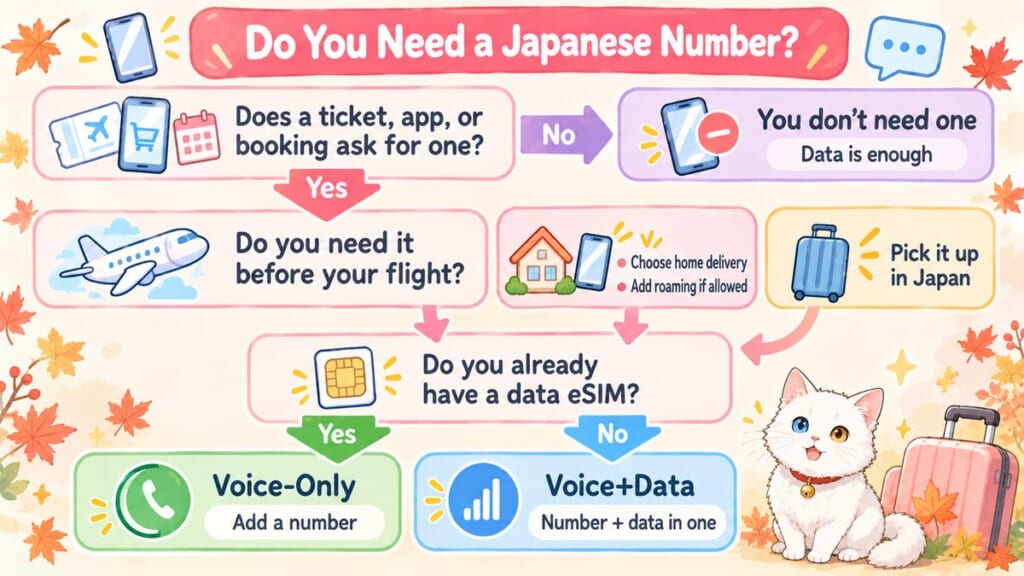
 You don’t need to buy a Japanese number just because you’re visiting Japan. For an ordinary sightseeing trip, data for maps, translation, and messages will usually cover your needs.
Consider a number if one of these applies to you:
- Your event ticket or lottery application requires Japanese phone verification.
- An app you want to use, such as a scooter-sharing or collaboration-café booking app, specifically requires a Japanese number.
- A ryokan or restaurant accepts reservations by telephone, and you need a calling option.
- An airline, clinic, or other organization asks for a local number for a call-back.
- A work or study arrangement specifically asks you to provide a Japanese number.
| Situation | Do you need a Japanese number? |
|---|---|
| Maps, translation, browsing, and messaging apps | No; mobile data is usually enough. |
| Tickets or lotteries requiring domestic phone verification | Yes, for that booking route; check for an official overseas sales option first. |
| App registration | Only if that app requires it; an SMS screen alone doesn’t prove this. |
| A telephone-only reservation | You need a way to call; a Japanese number isn’t automatically required. |
| A call-back, work, or study contact | Useful, or required if the organization specifically says so. |
Need a number only (you already have a data eSIM)? → Mobal Voice-Only eSIM
Need a number + data in one eSIM? → Mobal Voice+Data eSIM
Just need data? → Best eSIM for Japan
If you need a number, jump to “Three Ways to Get a Japanese Number (Compared)” below. If the deadline is before your flight, also read the roaming section before buying: receiving an SMS abroad and completing a ticket site’s verification are different things.
Why Japanese Sites Reject Foreign Numbers

Your overseas number may be perfectly valid, but a Japanese domestic registration system may not accept it. Some services build verification around domestic mobile numbers, including numbers beginning with 070, 080, or 090, rather than international dialing formats.
Lawson Ticket explains that phone verification helps prevent unauthorized account use and accounts created by someone impersonating another person. That supports an account-security explanation; it doesn’t mean every app uses the same checks or that every restriction exists to prevent ticket resale.
Why Japan does it this way: From my perspective as a mother living in Japan, a mobile number can function as a practical account identifier, beyond being somewhere to call. These checks establish that you control the registered number; they aren’t the same as checking your passport at the venue. That distinction helps explain why changing the country code doesn’t necessarily solve the problem.
Official sources: Lawson Ticket: phone number verification (Japanese)
Where You’ll Hit the Wall: Tickets and Apps

 Check the exact sales route before buying a SIM. A domestic ticket account, an overseas ticket page, and the app used to display the ticket can have different requirements, even for the same concert.
| Service | What its official help confirms |
|---|---|
| Lawson Ticket: Lawson WEB membership | Verification uses an incoming voice call to a Japanese mobile number. Its help says verification cannot be completed from outside Japan. |
| e+: domestic eplus.jp registration | Registration requires a Japanese mobile phone capable of phone verification. Its help directs overseas customers to eplus.tickets. |
| Ticket Pia | Its phone-verification guide describes calling a designated number from your registered phone number; receiving an SMS isn’t the same procedure. |
| LUUP | Account registration uses SMS; its troubleshooting guide says authentication messages use international SMS. |
Travelers on Reddit report that Mobal roaming has not always completed Ticket Pia’s call verification. Those are individual reports, not proof that every attempt will fail; use them as a reason to ask about your exact verification method before paying.
For a family outing, also check ticket distribution before ordering several seats. The person buying the tickets and each person receiving an electronic ticket may face different account or phone requirements.
Official sources: Lawson Ticket (Japanese) · e+ (Japanese) · Ticket Pia · LUUP
Data-Only eSIM vs. a Real Japanese Number
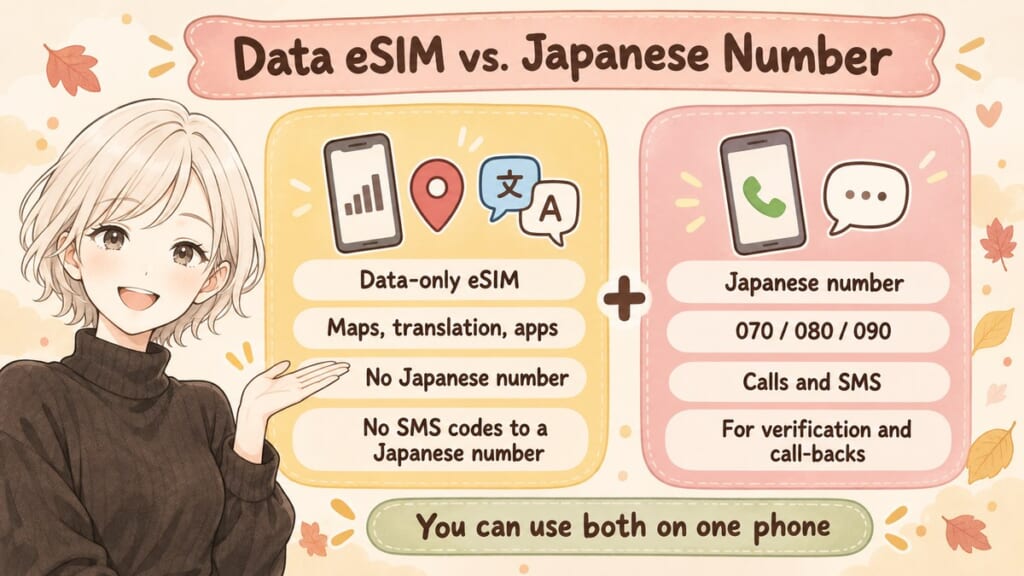
A data-only travel eSIM gives you internet access, not a Japanese mobile number for calls and SMS. WhatsApp or another messaging app can use that connection, but a verification text addressed to a Japanese number cannot arrive through the data-only line.
Mobal’s voice eSIMs provide a real 070, 080, or 090 number on the Docomo network. Mobal says many institutions don’t accept virtual numbers such as 050 numbers.
 For emergency calls, don’t rely on a data-only eSIM as your calling line for 110 (police) or 119 (fire and ambulance). Plan another way to reach help, such as asking nearby staff to call, and read the emergency-calling guidance in my guide to the best eSIM for Japan.
If you still need to choose your internet connection, my Airalo vs Ubigi comparison covers that separate decision. Here, the question is whether you need a number alongside your data.
Three Ways to Get a Japanese Number (Compared)
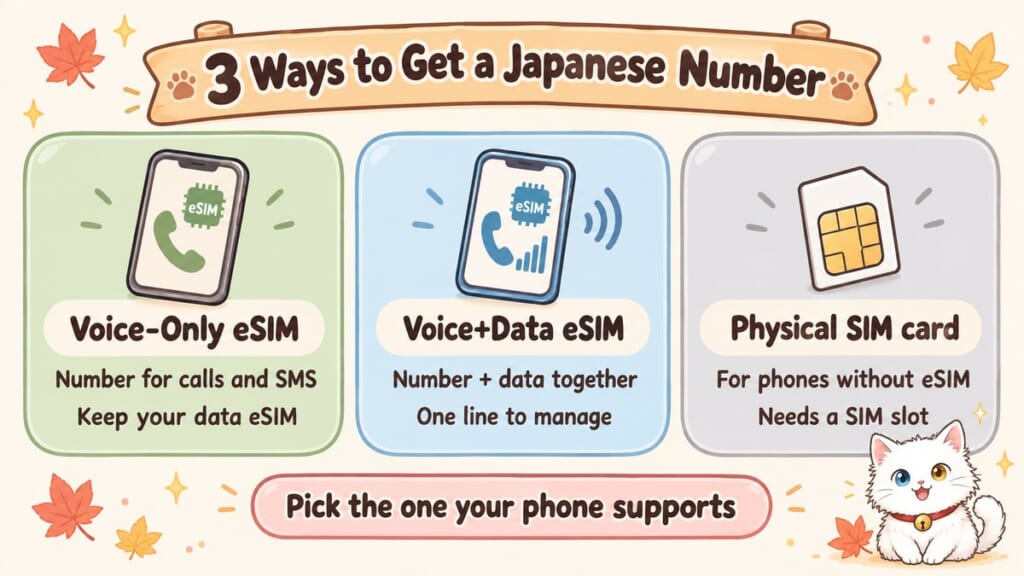
 Start with what you already have. If your data eSIM is sorted, a voice-only line avoids buying a second data allowance; if it isn’t, one voice-and-data line may be easier to manage.
The Mobal prices and conditions below are from its official information, checked October 19, 2026. Dollar figures are rough, at ¥155 to $1.
| Method | Who it suits and indicative cost |
|---|---|
| Voice-Only eSIM | Add calls and SMS beside your existing data eSIM: ¥4,950 (about $32) for the eSIM, plus ¥1,430 (about $9) per month. |
| Voice+Data eSIM | Get a number and data together: ¥4,950 (about $32) for the eSIM, plus monthly plans from ¥1,650 (about $11); alternatively, Tourist 30-day Voice+Data costs ¥9,900 (about $64) in total with 10GB. |
| Physical voice-and-data SIM | Consider Mobal’s Voice+Data SIM card if your unlocked phone has a compatible SIM slot but doesn’t support eSIM. Check the current card plan before ordering. |
Choose the format your phone supports, then match the plan to the data you actually need. For a deadline before departure, confirm the verification route and roaming requirements first.
Mobal lists Voice-Only alongside its long-term plans, but there’s no minimum term and you can cancel anytime. You need to be 18 or older and pass the ID check.
Sakura Mobile is another option: its official guide says tourists can obtain a voice-and-data SIM with a passport and collect it at Narita, Haneda, or Kansai Airport, or its Shinjuku office. Check the specific plan’s collection and cancellation conditions when comparing.
Why ¥4,950 for an eSIM? ID Checks and Pick-Up

That upfront amount is Mobal’s eSIM purchase price, separate from the service plan. It isn’t a government fee, and Mobal doesn’t provide a breakdown showing how much pays for identity checks or postage.
Mobal explains that Japanese law requires the person using a voice line to be identified. Its voice eSIM access code therefore comes by post or through in-person collection, rather than immediate email delivery; the eSIM is still installed digitally afterward.
- Delivery before you fly: Mobal offers free delivery to the countries on its delivery list, sent to the address on your ID. If your passport doesn’t show your address, check which ID documents you can use when ordering. Check the country-specific documents and delivery estimate at checkout, allowing time for ID approval as well as postage.
- Pick-up in Japan: Bring your order confirmation and passport yourself, with the order name matching your passport. Mobal’s terms say someone collecting on your behalf will be turned away, so a friend cannot pick it up for you. The listed Haneda location is the JAL ABC arrivals counter on the second floor of Terminal 3, open 4:00 a.m.–1:00 a.m. the following day. Narita Terminal 1 and other airport or city locations are also listed; select the actual counter and date during ordering, especially for a late arrival.
 For now, Mobal’s data-only eSIMs arrive by email within minutes with no ID required. Japan’s Ministry of Internal Affairs and Communications says ID checks will also cover new data-only SIM contracts from April 2027, and short-term visitors may be included, so this may change.
| Item | Amount |
|---|---|
| Voice eSIM purchase | ¥4,950 (about $32), paid when ordering; separate from the plan fee. |
| Voice-Only monthly plan | ¥1,430 (about $9). First calendar month prorated from activation; subsequent monthly billing starts on the 1st. |
| Ongoing Voice+Data monthly plans | 1GB: ¥1,650 (about $11); 5GB: ¥3,190 (about $21); 10GB: ¥3,630 (about $23); 15GB: ¥3,795 (about $24); 30GB: ¥4,378 (about $28); 50GB: ¥5,280 (about $34). First calendar month prorated; subsequent monthly billing starts on the 1st. |
| Tourist 30-day Voice+Data | ¥9,900 (about $64) total: ¥4,950 (about $32) when ordering plus ¥4,950 (about $32) at activation. |
| Optional voice/SMS roaming | ¥5,995 (about $39) each time you enable it; additional usage charges can apply. |
| Outgoing domestic calls in Japan | ¥44 per minute (about $3 for a 10-minute call). Outgoing SMS is charged separately. |
The ongoing Voice+Data plans include Docomo 5G access, unused-data rollover, and reduced-speed data at up to 200Kbps after the high-speed allowance runs out. Choose the allowance for your trip rather than treating that reduced speed as a substitute for normal browsing.
Official sources: Mobal eSIM plans and prices · ID requirements · collection locations
Can You Get the SMS Code Before You Fly?
Yes, Mobal currently offers an option for receiving SMS outside Japan, including on its current Voice-Only plan. Its Voice & SMS Roaming / SMS Verification add-on costs ¥5,995 (about $39) each time you enable it, with incoming SMS free while roaming.
Arrange delivery to your home, activate the eligible line, and enable roaming before you need the code. Airport collection won’t help with a lottery that closes while you’re still abroad, and Mobal says roaming activation can take approximately 24 hours.
The add-on covers voice and SMS, not mobile data abroad. Calls and outgoing SMS can cost extra; you also cannot listen to voicemail overseas, and Mobal warns that messages left in voicemail while roaming can trigger charges.
You may find older posts saying Mobal doesn’t support roaming. Mobal’s current help page says only certain newer voice products support it.
Before paying, check these three things:
- Does the service need an incoming SMS, an incoming call, or an outgoing verification call?
- Is the verification deadline before your departure?
- Before relying on it, check that the roaming option appears for your line in MyAccount.
Lawson WEB membership explicitly rules out verification from outside Japan, so buying roaming doesn’t remove that restriction.
If your service accepts verification from abroad and its deadline precedes your trip, consider the add-on. If verification can wait until Japan, you can leave it out and spend that money elsewhere.
Official sources: Mobal: international roaming
Add a Number to Your Data eSIM (Dual SIM)
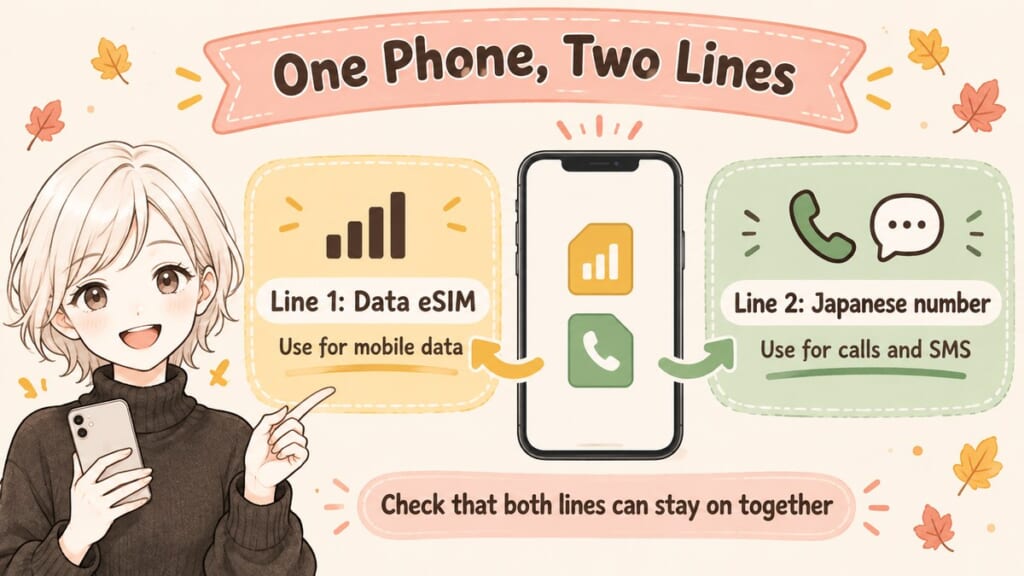
If you’ve already chosen Airalo, Ubigi, or another data-only plan, you may be able to keep it for internet access and add Voice-Only for calls and SMS. First check that your phone can keep those two particular SIM lines active together; storing two eSIMs isn’t necessarily the same as using both simultaneously.
Use your phone manufacturer’s official dual-SIM instructions for your exact model and region. Select your travel data plan for mobile data and the Mobal line for outgoing calls or SMS when needed, keeping the Mobal line enabled to receive messages.
An app may impose additional setup requirements, so follow its instructions if it cannot recognize the correct number. For the separate data-plan choice, see my Airalo vs Ubigi comparison.
Official sources: Apple: using two SIMs on iPhone · Google: dual SIM on Pixel
Step by Step: Order, Pick Up, Activate, Pay
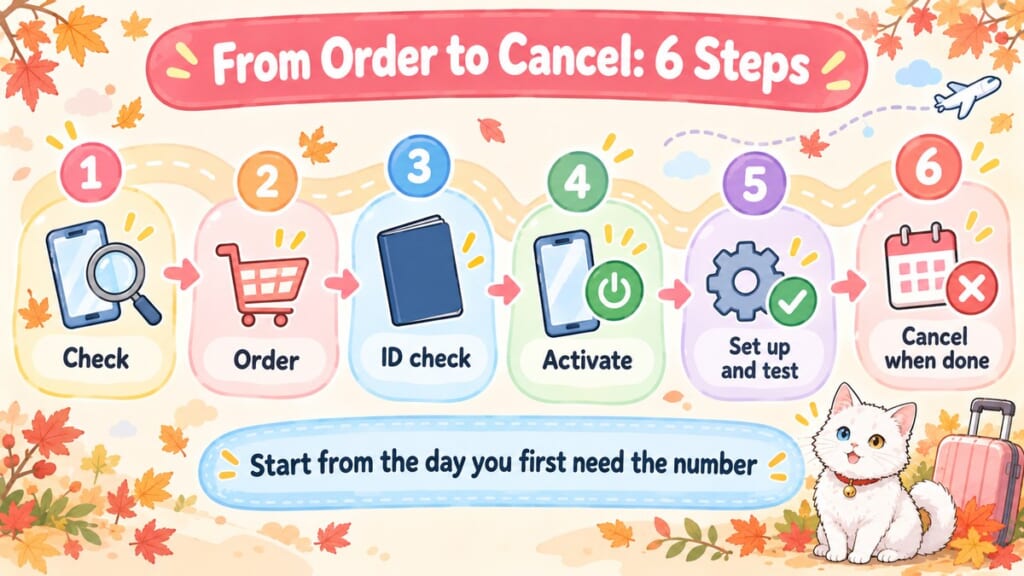
Work backward from the first day you need the number, which might be earlier than your flight. Leave room for delivery, activation, and the ticket service’s own verification process.
- Check the requirement and your phone. Confirm the service’s verification method, your phone’s unlocked status, and compatibility with the voice SIM or eSIM.
- Order and choose delivery or collection. Use your own ID name and select a supported shipping address or a collection counter and date.
- Complete the identity check. Upload the required documents for delivery; for collection, personally show your passport and order confirmation.
- Request activation in MyAccount. Enter the access code, follow any device-information prompts, and choose your plan and activation date. Allow processing time rather than expecting an instant number at the counter.
- Install and configure the line. Follow Mobal’s installation instructions and any required APN settings, which tell your phone how to connect. Add roaming if needed and test the specific verification process before its deadline.
- Check billing and arrange cancellation. Ongoing plans charge a prorated first calendar month, followed by full monthly plan fees. Use MyAccount to choose your cancellation date when you no longer need the number.
Mobal’s activation guide distinguishes the monthly invoice on the 1st from automatic payment on the 8th. A trip crossing into another calendar month can therefore incur another full monthly plan fee, even if you’re leaving soon afterward.
Cancellation ends the number permanently, and call or text usage charges can arrive later. Keep the line until you’ve finished any ticket access or call-backs that depend on it. For ongoing plans, your plan and billing continue until you submit a cancellation request in MyAccount, even if you switch the eSIM off on your phone.
Official sources: Mobal activation guide · termination requests
Phone-Only Bookings and Airline Call-Backs

A telephone-only reservation needs a way to call, but doesn’t automatically require you to own a Japanese number. Before buying one just for a single booking, ask whether your existing phone service or your hotel’s assistance can handle it.
A local number becomes more useful when the business needs to call you back. For Mobal calls made within Japan, the published domestic rate is ¥44 per minute (about $3 for a 10-minute call); incoming calls and incoming SMS are free in Japan.
 If the person answering doesn’t speak English, keep the request short and your dates written down. These phrases can start the conversation, though you may still need help understanding the reply.
Do you speak English?
Eigo o hanasemasu ka?
英語を話せますか?
I’d like to make a reservation.
Yoyaku o shitai desu.
予約をしたいです。
Could you call me back at this number?
Kono bangō ni orikaeshi o-denwa o itadakemasu ka?
この番号に折り返しお電話をいただけますか?
For follow-up contact after losing something or visiting a clinic, see my guide to getting lost items back in Japan and my guide to getting sick in Japan. If you’re choosing somewhere to stay, my guide to Tokyo and Kyoto hotels with a spa helps you narrow the accommodation first; check each property’s available booking channels directly.
Long Stay? Where the Tourist Options Stop
If you’re moving to Japan and have a residence card, domestic budget mobile plans may become another route to explore. Their accepted documents, payment methods, and contract requirements need a separate comparison.
Don’t assume a number obtained for this trip can later move to every other provider. Ask both providers about your exact product before choosing it as a long-term number.
FAQ

Can I get a Japanese phone number as a tourist?
Yes, tourist voice-and-data products are available, with identity checks and phone-compatibility requirements. Mobal offers a 30-day Voice+Data eSIM, while Voice-Only has no minimum term and can be canceled anytime. You need to be 18 or older and pass the ID check.
Do I need a Japanese phone number for concert tickets in Japan?
Sometimes; it depends on the event’s sales route and ticket-delivery method. Check for an official overseas sales page before arranging a number for domestic registration.
Can I receive SMS verification codes from Japan while I’m still abroad?
Yes, an eligible Mobal voice line with its roaming add-on can receive incoming SMS abroad. That doesn’t guarantee a ticket site’s verification will work, especially when it requires a phone call or restricts verification to Japan.
Why do I need to show ID for a voice eSIM but not a data eSIM?
Mobal explains that Japanese requirements for voice services mean it must verify the user. Its current guidance doesn’t require an ID upload for its data-only products.
Can I share one Japanese number with my family for tickets?
It depends on the service and event; Lawson WEB membership, for example, does not allow the same verified phone number to be shared between member accounts. Check each event’s companion registration and ticket-distribution rules before ordering for the whole family.
Choose Your Number, Delivery, and Timing
 If none of your bookings or apps needs a Japanese number, you can close this page without buying one and get back to planning the parts of your trip you’re looking forward to. If you do need one, keep it simple: Voice-Only alongside your existing data, or Voice+Data for both together.
Choose postal delivery for a number you need before departure, or collection in Japan if that timing works. Add roaming only when you need the line abroad and the target service permits that verification route.
For internet access, continue with my guide to the best eSIM for Japan or my Airalo vs Ubigi comparison. To fit the booking deadline into the rest of your preparations, see my 7-step guide to planning your first trip to Japan.
Which booking or app asked you for a Japanese number? Let me know in the comments, without posting your phone number or verification code.
I hope this guide has answered one of your questions and helped you feel a little closer to Japan.
May your Japan journey be filled with wonderful discoveries and memories you’ll treasure for years to come.
See you in the next guide.




Comments