- Quick Answer: Go to 7-Eleven or the Post Office
- Which ATMs Accept Foreign Cards
- Step by Step at a 7-Eleven ATM
- “Accept With Conversion” or “Without”?
- Fees and Limits: Who Actually Charges You
- Card Declined? Check These 5 Things
- Before You Fly: Cards and Settings to Prepare
- Did Your Card Work? Tell Me Which ATM You Used
Quick Answer: Go to 7-Eleven or the Post Office
 You need cash for dinner, and the nearest ATM has just rejected your card. Start with a Seven Bank ATM at 7-Eleven or a Japan Post Bank ATM at a post office: these are the most practical first stops for using a foreign card at Japan ATMs. Both support overseas-issued cards, although your particular card still needs to be compatible.
Not sure how much to take out in the first place? My guide to how much cash to bring to Japan breaks it down by trip length and for a family of four.
Many ordinary bank-branch ATMs don’t accept overseas-issued cards, so the nearest bank isn’t necessarily your best option. If you’re travelling with tired children after dark, I’d look for a nearby 7-Eleven and check the ATM’s card logos before heading over.
At the currency screen, choosing Japanese yen means leaving the conversion to your card provider; choosing your home currency accepts the ATM’s conversion offer. If your withdrawal fails, check the service hours, your bank’s settings and your withdrawal amount before trying a different ATM.

Which ATMs Accept Foreign Cards
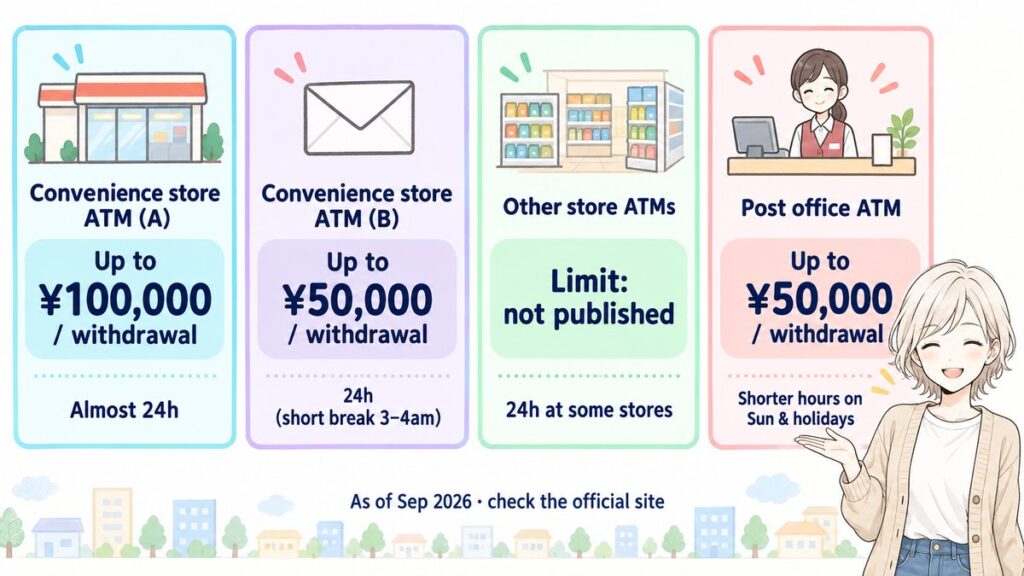
Before you walk to the next convenience store, check the ATM operator’s name as well as the store sign. I’ve put the main options in the table below to help you choose where to try. Even with a matching logo, your particular card might not work.
Limits and service hours below are as of September 2026. All times are Japan time; access may be shorter because of the individual location or maintenance.
| ATM / usual location | Listed card brands and networks | Limit per withdrawal | ATM-side fee information | Service hours | Languages |
|---|---|---|---|---|---|
| Seven Bank / 7-Eleven | Visa, Mastercard, UnionPay, American Express, JCB, Discover, Diners Club | ¥100,000 (≈$650); ¥30,000 (≈$195) for magnetic-stripe transactions | Varies by card brand; no fixed amount published. Check the screen. | Visa/Mastercard: 24 hours; other brands: see below | Japanese plus 10 languages, including English |
| Lawson Bank / participating Lawson stores | Visa, Plus, JCB, UnionPay, Mastercard, Maestro, Cirrus | ¥50,000 (≈$325), in ¥10,000 (≈$65) increments | Fee applies; no fixed amount published. Check the screen. | 24 hours, with a 15-minute maintenance stop between 03:00 and 04:00 | Japanese, English, Chinese, Korean |
| E-net / selected FamilyMart, Don Quijote and other stores | Visa, Mastercard, UnionPay, JCB | Not listed on the official site | Varies by the bank handling the withdrawal; no fixed amount published. Check the screen. | 24 hours, 365 days a year at participating locations | Not listed on the official international-card page |
| Japan Post Bank / post offices and some FamilyMart stores | Visa, Plus, Mastercard, Maestro, Cirrus, JCB, UnionPay, Discover | ¥50,000 (≈$325) | ¥220 including tax may apply to certain overseas-issued cards | Post-office and compact ATMs have different schedules; see below | Not listed on the official international-card page |
Check current details through Seven Bank’s official card guide, Lawson Bank’s official guide, E-net’s official guide and Japan Post Bank’s official guide.
Prices are in yen, with rough dollar figures at about ¥154 to the dollar (September 2026). Exchange rates move, so treat the dollars as a ballpark.
For Seven Bank, the other brand schedules as of September 2026 are 00:10–23:50 for UnionPay, JCB and Discover; 00:05–23:50 for AmEx; and 00:05–23:55 for Diners Club. These are card-service hours, so check that you can also enter the building where the ATM sits.
Japan Post Bank’s published post-office ATM service window as of September 2026 is 07:00–23:00 Monday–Saturday, excluding holidays, and 07:00–21:00 on Sundays, holidays, December 31 and January 1–3. Individual locations may open for shorter hours. Its compact ATMs in FamilyMart and similar locations have a published non-holiday window of 00:05–23:55, starting at 07:00 on the third Monday; check the specific location for holiday access.
 Some Lawson and FamilyMart locations have ATMs that don’t support overseas cards. FamilyMart may have E-net or a compact Japan Post Bank ATM, so don’t assume every store has the same machine. Japan Post Bank also doesn’t offer balance enquiries for overseas-issued cards; use your bank app to check your balance.
You can also withdraw before leaving the airport. Seven Bank lists ATMs at New Chitose, Narita, Haneda, Chubu Centrair, Kansai, Fukuoka and Naha; Lawson Bank lists Haneda Terminal 3, Narita Terminals 1 and 3, Kansai and Naha. Use the operators’ location guides to find the machine in your terminal.
Step by Step at a 7-Eleven ATM
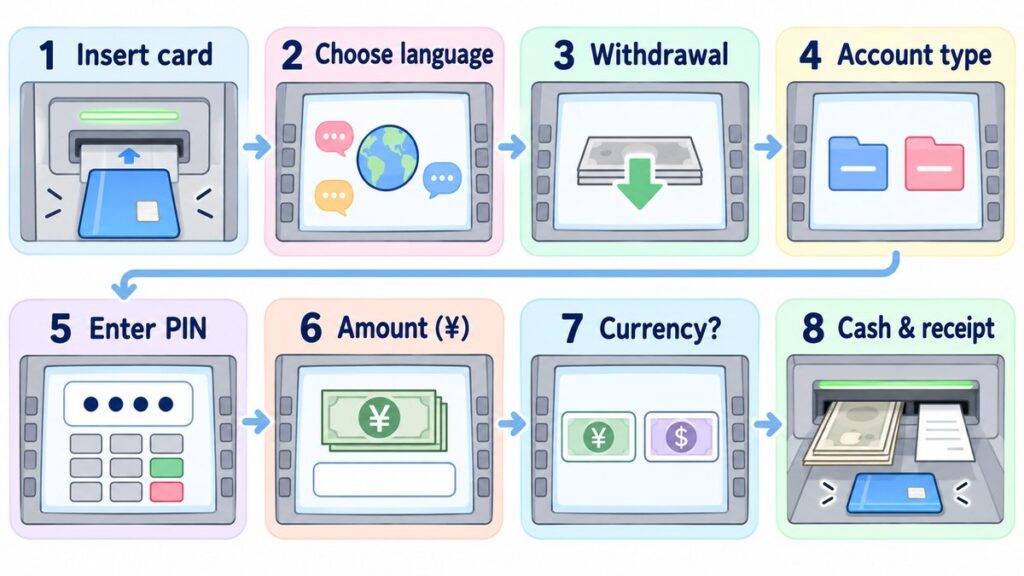
You can follow the withdrawal steps below one at a time. Choose the withdrawal service and follow the prompts for your own card. Seven Bank’s official walkthrough uses a Visa card, so another card may skip the currency-selection step.
- Insert your card. Seven Bank’s guide shows the magnetic stripe facing down; follow the diagram beside the slot.
- Choose your language. The options include English, Chinese, Korean, Thai, Malay, Indonesian, Vietnamese, French, German and Portuguese, plus Japanese.
- Select “Withdrawal”. You’re taking Japanese yen out of the account linked to your card.
- Choose the account type. Select the account your issuer tells you to use for overseas ATM withdrawals. If you’re unsure, check its instructions rather than choosing an unrelated account.
- Enter your PIN and confirm. Use the PIN for that physical card.
- Select the withdrawal amount in yen. Keep it within both the ATM’s limit and your own available allowance.
- Choose the billing currency if prompted. Read the next section before accepting a home-currency conversion.
- Collect your cash, card and receipt. Check that you have all of them before leaving.
The screen and receipt use the language you selected. Read any fee information before confirming; an English screen helps you check the actual terms rather than guessing what a button means.
 If the cash is for topping up a physical Suica, withdrawing and topping up are separate operations. See my Suica vs Pasmo guide for the cash top-up steps, so you can finish both tasks before heading to the station.
“Accept With Conversion” or “Without”?
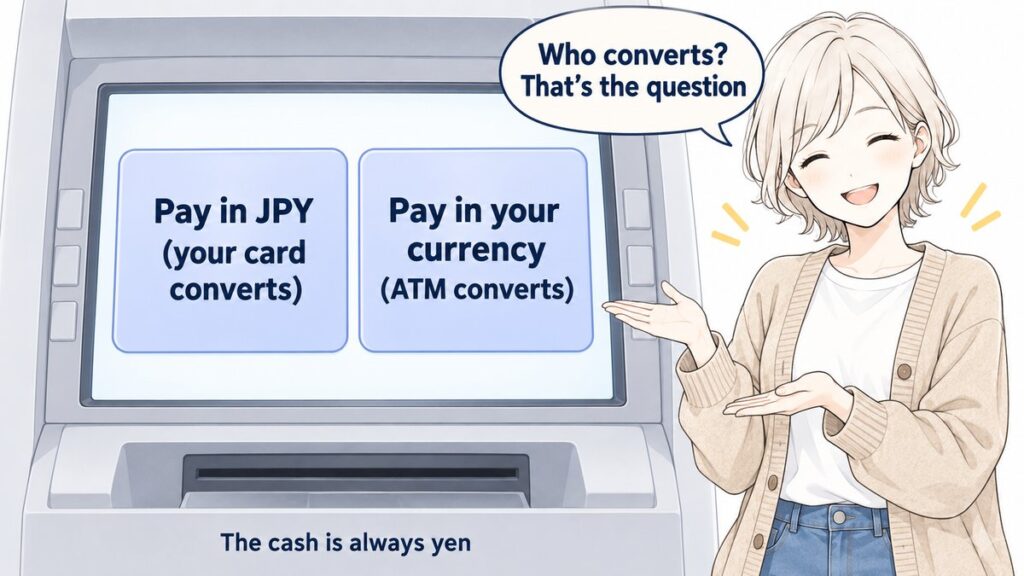
Choose Japanese yen if you want your card provider to handle the conversion. Choose your home currency if you want to accept the ATM’s offered conversion and fix that home-currency transaction amount now. If you’re wondering what comes out of the machine, it’s Japanese yen whichever option you choose.
Seven Bank calls this Dynamic Currency Conversion, or DCC. Its explanation says that choosing your home currency determines the amount in that currency when you use the ATM; choosing yen leaves the home-currency amount to be fixed later at billing.
If the screen says “with conversion”, you’re accepting the ATM’s conversion offer; “without conversion” leaves the transaction in yen. The buttons can differ, so check the currency shown instead of remembering a button’s colour or position.
 Choose “without conversion” if you want your card provider’s conversion terms to apply. That doesn’t mean yen will always cost less: it depends on the offered rate and your card’s conditions. The key is knowing who’s doing the conversion.
At Seven Bank, DCC is offered for Visa and Mastercard. JCB, AmEx, Discover, Diners Club and UnionPay don’t use this currency-selection service there, so the missing screen isn’t itself a problem. Japan Post Bank also describes a home-currency settlement option for certain cards, but don’t assume its screen looks the same.
Fees and Limits: Who Actually Charges You
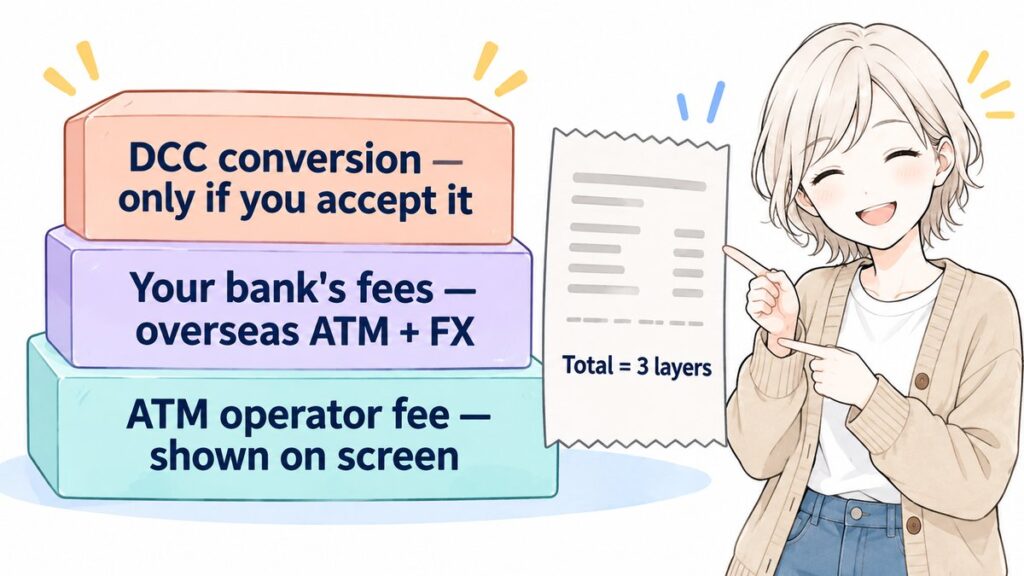
If a withdrawal costs more than you expected, here’s how you can work out where the charges came from. Withdrawing at 7-Eleven doesn’t mean every charge comes from Seven Bank: check the ATM fee, your card issuer’s fees and any DCC conversion cost separately.
The ATM operator’s charge is the first layer. Seven Bank publishes that fees vary by card brand; Lawson Bank doesn’t publish a fixed amount, and E-net says fees depend on the bank handling the withdrawal. Read the fee information shown on the ATM screen before proceeding. Japan Post Bank states that certain overseas-issued cards may incur ¥220 per withdrawal, including tax.
Your own bank or card issuer’s charges are the second layer. These can include an overseas ATM withdrawal fee and foreign-exchange or foreign-transaction charges under your card agreement. They can add substantially to the total, so check these terms before departure rather than judging the cost from the ATM receipt alone.
The third layer is the DCC conversion cost, if you accept that service. Check the offered exchange rate and any conversion fee shown on the screen before you accept. The cost may be included in the conversion quote rather than listed as a separate fixed ATM fee.
If the total surprises you, compare the ATM receipt with the completed transaction in your bank app, then ask your card issuer to explain any difference. The store’s name alone won’t tell you who charged each fee.
Withdrawal caps are a separate issue. As of September 2026, Seven Bank’s limit is ¥100,000 (≈$650) per transaction, or ¥30,000 (≈$195) for magnetic-stripe transactions; Lawson Bank and Japan Post Bank allow up to ¥50,000 (≈$325) per transaction. Lawson withdrawals must be in ¥10,000 (≈$65) increments, and E-net’s international-card page doesn’t publish a per-withdrawal cap.
These are per-transaction limits, not your daily allowance. Your issuer sets its own daily limits and may also apply other restrictions, so repeated withdrawals won’t override them. Where a fee applies per withdrawal, splitting the amount into several transactions can also mean paying that fee several times.
Card Declined? Check These 5 Things
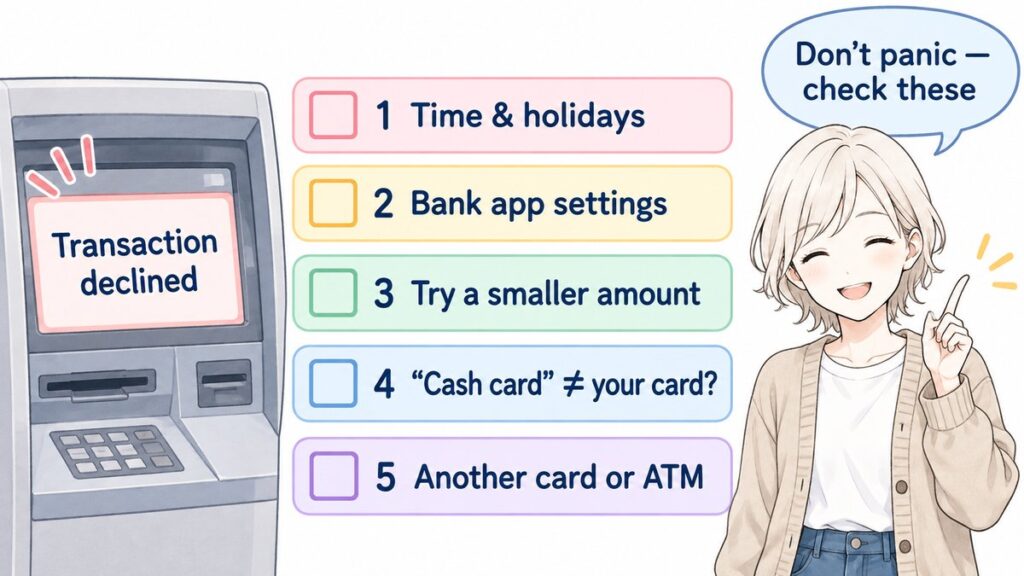
You don’t have to guess why your card was declined. The failed withdrawal alone doesn’t tell you the cause, but these five checks can help you decide whether to try a different time, a smaller amount, another ATM or a change in your bank’s settings.
- Check the time and holiday schedule. As of September 2026, Japan Post Bank’s published post-office ATM window ends at 21:00 on Sundays and holidays, and some locations close earlier. Golden Week and year-end/New Year schedules may change. Lawson Bank has a 15-minute maintenance stop between 03:00 and 04:00; if maintenance is the problem, try after it ends or use another operator.
- Check your bank app’s overseas and ATM settings. If your issuer provides separate controls, make sure both are enabled. Look for a security alert and check your available balance and remaining withdrawal allowance; being able to pay in a shop doesn’t mean you can also withdraw cash at an ATM.
- Try a smaller amount. As of September 2026, Seven Bank’s magnetic-stripe transaction cap is ¥30,000 (≈$195). That lower cap could explain why a larger request fails, even though the general limit shown in the table is higher. Seven Bank advises reducing the amount if you exceed the withdrawal limit.
- Check what “cash card” means. In Japanese, kyasshu kādo means a card used to access a bank account; the term alone doesn’t tell you whether an overseas debit card will work. If staff say the machine is “for cash cards”, look for your network’s logo and the international-withdrawal instructions. Follow those prompts if your card is supported, but a working screen alone doesn’t mean the ATM accepts your card.
- Try another supported card or ATM operator. All four operators warn that some cards may not work, even if the logo matches or the card seems to meet their conditions. Try a card on another network, or use another operator’s ATM. One declined withdrawal doesn’t mean your card will fail everywhere in Japan.
 If those checks don’t resolve it, contact your card issuer using the number on your card or its official app. Tell it the ATM operator, time, requested amount and exact error message, but never share your PIN. Seven Bank specifically directs you to the issuer for an incorrect-PIN error.
Before You Fly: Cards and Settings to Prepare
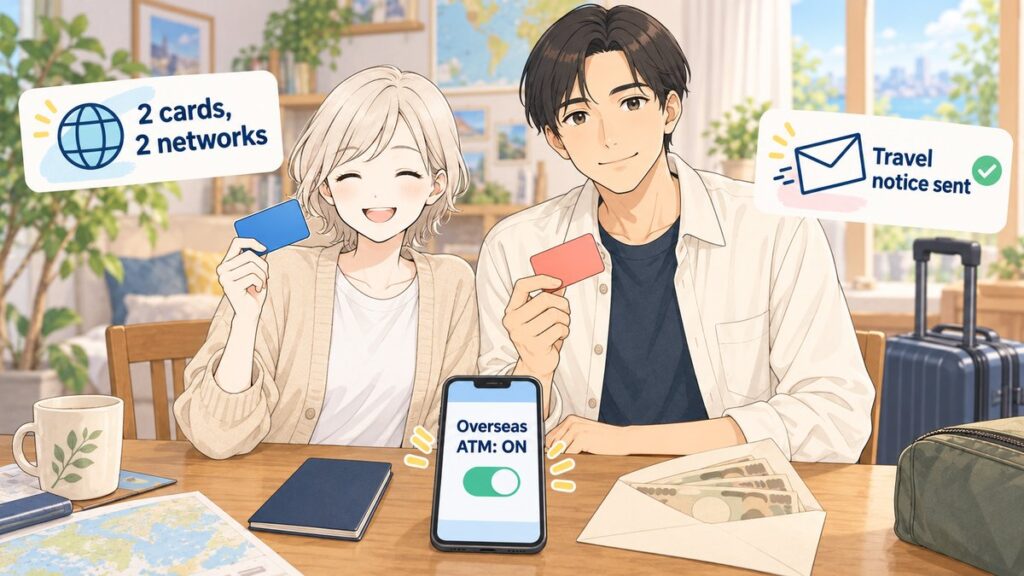
 Bring at least two physical cards on different networks if possible, and confirm that each supports ATM withdrawals in Japan. If you’re travelling as a family with two parents, I’d split the backup cards between the adults so one card that doesn’t work won’t leave everyone stuck.
Before departure, ask your bank to confirm overseas ATM access, the PIN, withdrawal limits and both ATM and exchange-related fees. Enable the relevant controls and submit a travel notification if your issuer requires or offers one. Check that you can access the banking app and its support contact while abroad.
Check where the money you’re withdrawing comes from. A debit-card withdrawal takes money directly from your bank account; a credit-card cash advance is borrowing and may come with interest and cash-advance fees. Read your card’s terms before using it for cash, even if you already use it for shopping.
If you are considering Wise or Revolut, check availability in your country and the provider’s current fees and ATM conditions. Treat the name as an option to investigate, not a guarantee of compatibility with every Japanese ATM.
For how much cash to withdraw, use my 10-day Japan budget breakdown to separate your expected cash spending from costs you plan to pay by card. If you’re setting cash aside for tax-free shopping, check the payment requirements and eligibility in my tax-free shopping guide before budgeting for those purchases.
Fit these checks into the 7-step Japan trip planning guide while preparing the rest of your trip. Having the bank settings ready and a nearby ATM saved gives you a clear starting point on arrival.
Did Your Card Work? Tell Me Which ATM You Used
 Your experience could help another traveller decide where to try. Did your card work in Japan? Which ATM did you use, and which country was your card issued in? Tell me in the comments below. I read every single one!
I hope this guide has answered one of your questions and helped you feel a little closer to Japan. May your Japan journey be filled with wonderful discoveries and memories you’ll treasure for years to come.
See you in the next guide. 



Comments